A free Workona alternative that needs no account
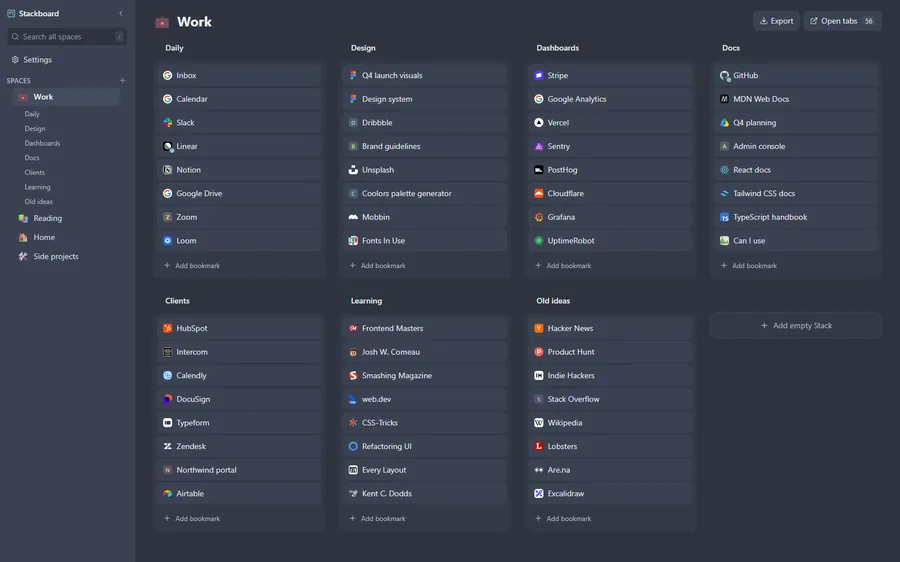
If you like Workona’s spaces but not the account, the cloud or the free plan’s space limit, Stackboard gives you spaces of links on your new tab page, stored as your own Chrome bookmarks and free in full. Workona does more for managing open tabs per project and for teams, so the comparison below shows where each one wins.
What Workona does well
Workona organizes work by project. Each space keeps the tabs you have open for that project, and you can save a project’s documents and links as resources. Tabs are saved automatically and sync between your computers, and Workona stores your spaces in its cloud so they’re backed up. Spaces can also hold notes and tasks.
The extension has about 200,000 users and 4.2 stars from about 3,800 ratings (October 2026). Besides the free plan there are Pro, Team (up to 25 people) and Enterprise plans.
What people switch over
- The free plan’s limits. Workona’s help pages say free accounts get a limited number of spaces and a limited number of sections per space. Go over the space limit and Workona locks your oldest spaces above it. You can upgrade, or export those spaces’ data and keep it (October 2026).
- An account and a cloud. Workona needs a sign-up and keeps your spaces on its servers.
- Recent reviews. Reviews from September 2026 mention Workona asking to install the extension when it was already installed, and one user losing more than 50 tabs and their tab groups.
Workona and Stackboard side by side
| Workona | Stackboard | |
|---|---|---|
| Where your spaces live | Workona’s cloud, behind an account | Ordinary Chrome bookmarks, no account |
| Free plan | A limited number of spaces and sections | Everything is free |
| Open tabs per project | Saved and synced per space as you work | No; Stackboard saves links, and your open tabs stay in Chrome’s tab strip |
| Save a window | Tabs are saved automatically | Stash this window (Alt+Shift+S), one stack per tab group |
| Notes and tasks | Yes | No |
| Teams | Team and Enterprise plans | No sharing or team features |
| Sync | Through your Workona account | Through Chrome sync |
| Price and code | Free plan; paid Pro, Team and Enterprise plans | Free and open source (MIT) |
When Workona is the better pick
If you switch between projects all day and want each project’s open tabs, documents, notes and tasks to travel together, or you work in Workona with a team on its Team plan, Workona is built for that and Stackboard isn’t. Stackboard suits people who want their links sorted into spaces on the new tab, private to their own browser, with nothing to pay for.
Move your spaces from Workona
- In Workona, click the gear icon at the bottom of the sidebar, choose Export data, then Begin export. You may be asked to sign in again. When it’s ready, click Download my data.
- Drop the exported JSON file into our session export converter, which reads Workona’s data export: each workspace becomes a folder with its tabs and resources. It runs in your browser and uploads nothing.
- Download the Stackboard backup (.json) and import it in Stackboard under Settings, Backup, Import JSON, or download a bookmarks file for Chrome’s Import bookmarks.
Once your spaces are in, a stack reopens as a named tab group in one click, and keys 1 to 9 jump between spaces.
Questions
Does Stackboard have a free plan limit like Workona?
No. There are no paid plans and no feature limits, and your spaces are ordinary Chrome bookmarks.
Can Stackboard restore a project’s open tabs like Workona?
Partly. Save the window with Stash this window, and later reopen that stack as a named tab group in one click. Stackboard doesn’t track or sync your open tabs as you work.
Do I need an account for Stackboard?
No. Stackboard has no account and no server. If Chrome sync is on, your spaces show up on your other computers like any bookmarks.
Try Stackboard
A free Chrome extension that turns your new tab into a board of your own bookmarks. No account, nothing leaves your browser.
Add to Chrome, it’s free