A Momentum alternative with a free tab stash that stays in Chrome
If what you want from Momentum is Tab Stash, Stackboard does that job for free: one shortcut saves every tab in the window as Chrome bookmarks on your new tab page, and they stay in your browser. If you use Momentum for its daily photo, focus and to-dos, keep it, because Stackboard has none of those.
What Momentum does well
Momentum turns the new tab into a calm dashboard. Its store listing offers a new background, mantra and quote each day, Focus Mode, simple to-do lists, website shortcuts and your local weather. About 2,000,000 people use it, and it holds 4.2 stars from about 13,700 ratings (October 2026).
Momentum Plus costs $39.95 a year (October 2026). It adds Tab Stash, unlimited Focus Mode, soundscapes, a Pomodoro timer and links to calendars and to-do apps such as Google Calendar, Todoist and Trello, among other extras.
Tab Stash, and where your tabs go
Tab Stash saves your open tabs so you can close them and come back later. Two things to know before you rely on it:
- It comes with Plus. Momentum lists Tab Stash among its Plus features, so it’s part of the $39.95 yearly plan (October 2026).
- Your tabs are stored on Momentum’s servers. Its privacy policy (updated 23 September 2026) says stashed tabs are sent to Momentum’s servers and stored so they can be restored from anywhere on your account.
That design lets you restore a stash on any computer, and the same policy says Momentum doesn’t track your browsing history. Reviews from October 2026 also mention Momentum resetting itself and losing tabs, and a weekly warning that data may be corrupted.
How Stackboard’s stash works
- Press Alt+Shift+S, or click the Stackboard icon and choose Stash this window. The popup also offers Save only if you want to keep the tabs open.
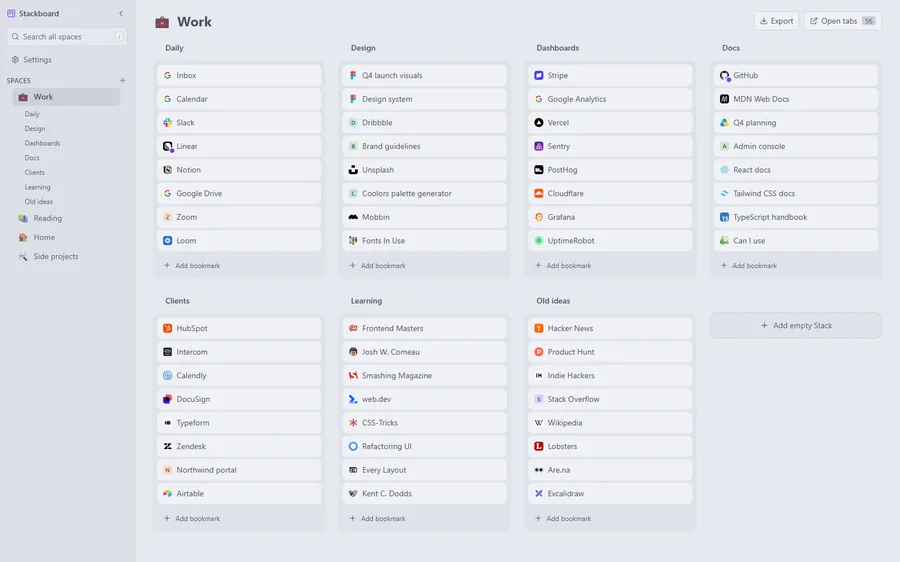
- Every tab becomes a bookmark in a Stash space: one stack per Chrome tab group, plus one for loose tabs. Pinned tabs and browser pages stay open.
- Open a new tab to see them. Rename stacks, drag links between stacks or press / to search.
- When you need them again, one click reopens a stack as a named tab group.
The stash is free, needs no account and lives in Chrome’s bookmarks under Other bookmarks › Stackboard. Stackboard has no server. If you use Chrome sync, your stash reaches your other computers the way any bookmark does. Other ways to save tabs, including Chrome’s own, are in our guide to saving all open tabs in Chrome.
Momentum and Stackboard side by side
| Momentum | Stackboard | |
|---|---|---|
| Tab stash | With Plus ($39.95 a year) | Free |
| Where stashed tabs go | Momentum’s servers, tied to your account | Your Chrome bookmarks |
| Account | A Momentum account for Plus | None |
| Daily photo, quote and mantra | Yes | No; you set your own background picture once |
| Focus, to-dos and weather | Yes | No |
| Links on the new tab | Website shortcuts | Spaces and stacks of your bookmarks, searchable with / |
| Price and code | Free; Plus $39.95 a year | Free and open source (MIT) |
When Momentum is the better pick
If the new tab is where you set a daily focus, check the weather and tick off to-dos, Momentum does that well and Stackboard doesn’t try. If you already pay for Plus and like having your stash on every device through your Momentum account, Tab Stash fits. Stackboard is for people who mainly want their links and saved tabs on the new tab, kept in Chrome, at no cost.
Bring your stashed tabs over
Open the tabs from your Momentum stash in one window, then press Alt+Shift+S and Stackboard saves the window as a stack. For the sites in Momentum’s shortcuts, save each one from the Stackboard toolbar popup, or copy your Chrome bookmarks bar into a space from Settings, Copy from Chrome bookmarks.
Questions
Is Momentum Tab Stash free?
No. Momentum lists Tab Stash as a Plus feature, and Plus costs $39.95 a year (October 2026). Stackboard’s stash is free.
Does Momentum store my tabs on its servers?
For Tab Stash, yes. Momentum’s privacy policy says stashed tabs are sent to its servers and stored so you can restore them from anywhere on your account.
Does Stackboard have quotes, weather or a to-do list?
No. It shows your bookmarks and saved tabs. You can set a background picture of your own, a gradient or a solid color, in light or dark themes.
Do I need an account to use Stackboard’s stash?
No. Stashed tabs are ordinary Chrome bookmarks, and Chrome sync carries them to your other computers if you have it on.
Try Stackboard
A free Chrome extension that turns your new tab into a board of your own bookmarks. No account, nothing leaves your browser.
Add to Chrome, it’s free