Arc Spaces in Chrome: how to get your spaces back after Arc
Chrome has no single feature that matches Arc’s Spaces, but three pieces get you most of the way: Chrome profiles for separate logins, tab groups for sets of open tabs, and a bookmark board such as Stackboard for each space’s saved links on the new tab page. Export your Arc spaces first with our free Arc exporter, because Arc has no export of its own.
Why people are leaving Arc
In May 2025 The Browser Company told Arc members it was putting its team on a new browser, Dia, and that Arc would keep getting Chromium updates and security fixes. In September 2025 Atlassian agreed to buy the company. Arc still runs, and arc.net still describes Spaces, but the site now says Arc receives Chromium updates only and points people to Dia. Arc runs on Chromium, the engine inside Chrome, which keeps the move to Chrome short.
What Arc’s Spaces did
Each Arc space had its own pinned tabs, its own unpinned tabs, a theme and an icon, all in the sidebar. A space could also use its own profile, which kept logins, cookies and history separate. Favorites sat above every space. Chrome spreads those jobs across separate features:
| In Arc | In Chrome | How close it gets |
|---|---|---|
| A space with its own logins | A Chrome profile | Close: each profile keeps its own bookmarks, history, passwords and settings |
| The open tabs in a space | A tab group | Close: named, colored, saved when you close it, and synced if Chrome syncs your tabs |
| Pinned tabs and folders | Bookmarks, shown as a board on the new tab with Stackboard | Your links come across and open as tabs when you click them |
| Space themes and icons | A color per profile; an emoji per Stackboard space | Partial |
Rebuild your spaces in Chrome
A profile for each set of logins
Click the profile icon at the top right of Chrome and choose Add Chrome profile. Each profile keeps its own bookmarks, history, passwords and other settings, and you switch between them from the same menu. It’s the right fit for spaces you kept for separate work and personal accounts.
Tab groups for the tabs you have open
Right-click a tab and choose Add tab to group, then New group. Right-click the group’s name to rename it or pick a color. When you close a group, Chrome saves it, and you can reopen it from the bookmarks bar or from the menu under Tab groups. If Chrome syncs your history and tabs, your groups follow you to other computers.
Your pinned tabs as spaces on the new tab
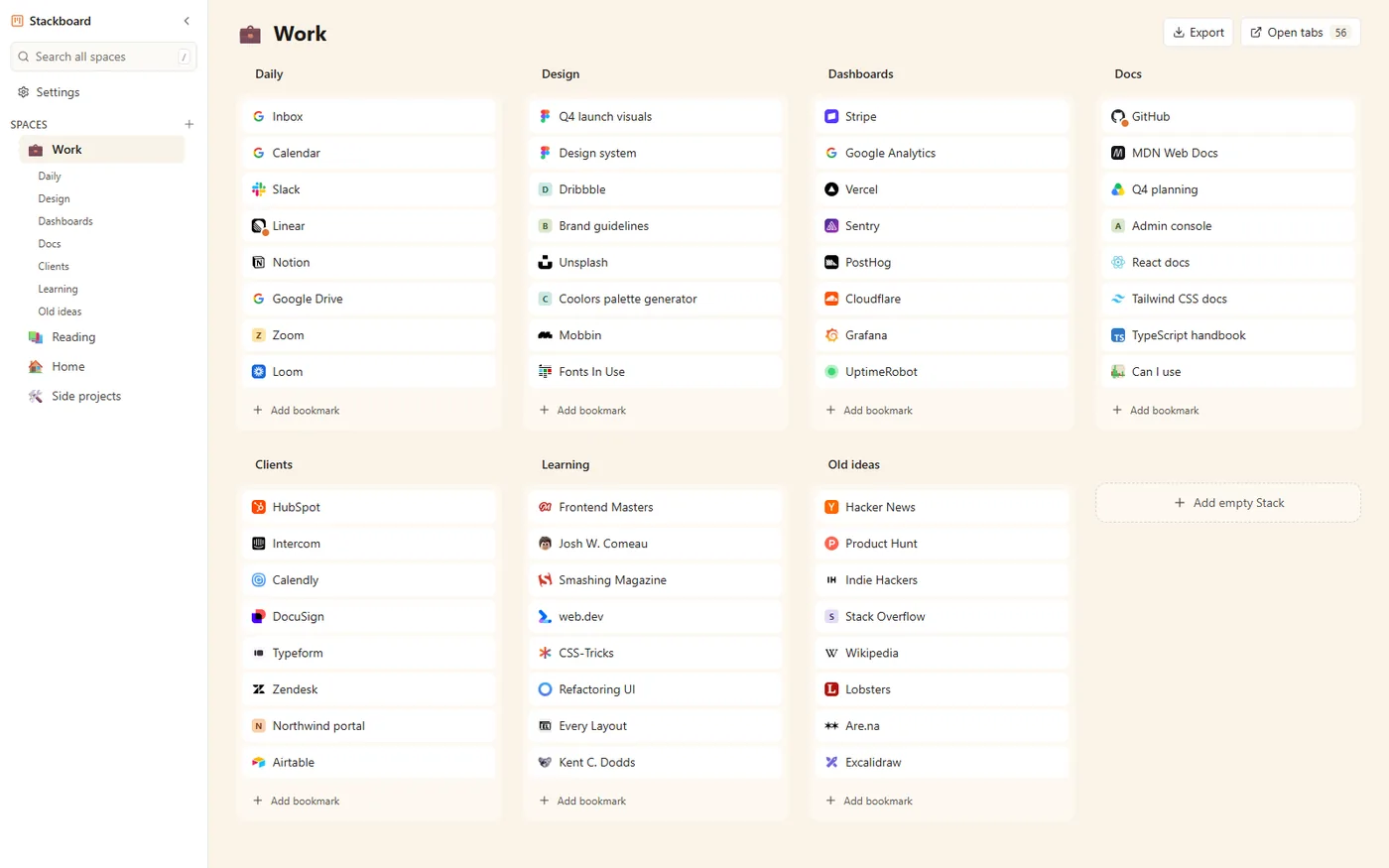
Arc’s pinned tabs work like saved links, and in Chrome saved links are bookmarks. Stackboard shows them as a board on the new tab page: spaces listed down the side, each with an emoji, and stacks of links across the page. A stack reopens as a named tab group in one click, which is the nearest thing to stepping back into an Arc space.
Stackboard’s spaces are boards of bookmarks on the new tab page. It has no sidebar of open tabs and no auto-archiving, and it stays on the new tab page, so your open tabs live in Chrome’s tab strip as usual.
Move your Arc spaces to Chrome
- Export from Arc. Arc has no export button, so use our Arc bookmarks exporter. It reads
StorableSidebar.json, the file where Arc keeps your sidebar (the tool page shows where it is on macOS and Windows), and turns each space into a folder with its pinned tabs and folders in order. Nothing is uploaded. - Pick a format. Download a bookmarks file for Chrome, or a Stackboard backup that gives you one Stackboard space per Arc space.
- Import it. For the bookmarks file, open
chrome://bookmarks, click the three-dot menu and choose Import bookmarks. For the Stackboard backup, open a new tab and go to Settings, Backup, Import JSON.
The full walkthrough is in moving from Arc to Chrome. Going to Zen? See moving Arc bookmarks to Zen.
What doesn’t come across
Arc’s Notes, Easels, Boosts and Little Arc windows aren’t bookmarks, so no export carries them. The Favorites at the very top of Arc’s sidebar are stored differently and may be missing, so add those few sites by hand. If the sidebar of tabs was the part you loved most, a bookmark board won’t replace it, and a browser designed around a tab sidebar will suit you better.
Questions
Does Chrome have spaces like Arc?
Not as one feature. Profiles separate logins and history, tab groups organize open tabs, and a new tab extension such as Stackboard keeps each space’s saved links in one place.
Can I export my Arc spaces?
Arc has no built-in export. Our Arc exporter reads the sidebar file Arc keeps on your computer and gives you a bookmarks file or a Stackboard backup, one folder per space.
Does Stackboard add a vertical tab sidebar to Chrome?
No. Its sidebar lists your spaces on the new tab page, and its stacks hold bookmarks. Open tabs stay in Chrome’s normal tab strip.
Is Arc still supported?
The Browser Company said in May 2025 that Arc would get Chromium and security updates while it works on Dia, and arc.net now says Arc receives Chromium updates only.
Try Stackboard
A free Chrome extension that turns your new tab into a board of your own bookmarks. No account, nothing leaves your browser.
Add to Chrome, it’s free