A Papaly alternative for your bookmarks in Chrome
If you’re replacing Papaly, export your boards now and keep them as ordinary Chrome bookmarks: Stackboard lays them out as spaces and stacks on your new tab page, free and without an account. Papaly’s website is still up, but its Chrome extension was last updated in June 2016 and its new tab extension is no longer in the Chrome Web Store.
What Papaly does well
Papaly lays your bookmarks out on boards in a simple two-dimensional layout, which makes a big collection easy to scan. You can import your browser’s bookmarks, share boards of your own and browse boards other people made. Its site offers Papaly for iOS, Chrome and Firefox, says you can export whenever you want, and pitches shared boards to teachers and teams as a way to hand out a set of links.
Why people are moving on
- The Papaly extension in the Chrome Web Store was last updated on 22 June 2016. It has about 7,000 users and 3.3 stars from 231 ratings (October 2026).
- Papaly’s new tab extension, the one that put your boards on every new tab, is gone from the store.
- Your boards live on papaly.com. With the extension untouched for ten years, a copy in your own browser is a sensible backup whatever you decide.
Papaly and Stackboard side by side
| Papaly | Stackboard | |
|---|---|---|
| Where your bookmarks live | On papaly.com | Your Chrome bookmarks (Other bookmarks › Stackboard) |
| On your new tab | No longer: its new tab extension is gone from the store | Yes, spaces and stacks on every new tab |
| Extension last updated | June 2016 | October 2026 |
| Sharing boards | Yes | No sharing |
| Other browsers and phones | The website, plus apps listed for iOS, Chrome and Firefox | Chrome and Brave on a computer |
| Account | Sign-up offered on papaly.com | None |
| Price and code | No pricing on its home page | Free and open source (MIT) |
When Papaly is still the better pick
If you share boards of links with a class or a club, or you open your bookmarks from an iPhone, Papaly does that and Stackboard can’t: Stackboard has no sharing and no mobile app. For a private board of your own links on Chrome’s new tab, Stackboard is the closer fit today.
Move your boards out of Papaly
- Export from Papaly. Sign in on papaly.com and use its export option. The home page says you can export whenever you want.
- Import into Chrome. If you get a bookmarks HTML file, open
chrome://bookmarks, click the three-dot menu, choose Import bookmarks and pick the file. If you get a plain list of links, paste it into our URL list converter first to make a bookmarks file. - Put it on your new tab. In Stackboard’s Settings, choose Copy from Chrome bookmarks and pick the top-level folder the import went into. Each folder that holds links becomes a stack, and the originals stay put.
What Stackboard gives you
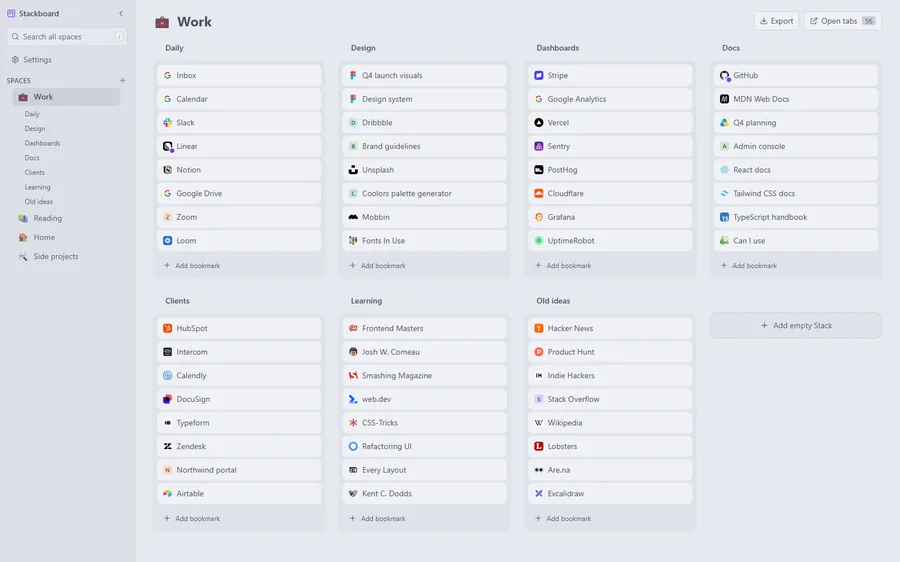
- Spaces in a sidebar, one per area of your life, each with an emoji, and stacks of links laid out as tiles.
- Search across every space with /, and keys 1 to 9 to jump between spaces.
- Undo for every delete, and a confirmation before a whole space goes.
- A one-click stash that saves every tab in a window as bookmarks.
Questions
Is Papaly still working?
Its website was still up in October 2026, but the Chrome extension was last updated in June 2016 and the new tab extension is no longer in the Chrome Web Store.
What is a good Papaly alternative for Chrome?
For a private board of your own bookmarks on the new tab, Stackboard is free, open source and stores everything as Chrome bookmarks. For pages shared across a team, start.me has a Team plan: see our start.me comparison.
Can Stackboard import Papaly boards directly?
No. Export from Papaly, import the file into Chrome’s bookmarks, then copy that folder into Stackboard in one click.
Try Stackboard
A free Chrome extension that turns your new tab into a board of your own bookmarks. No account, nothing leaves your browser.
Add to Chrome, it’s free