How to add shortcuts to Chrome’s new tab page, and the 10-shortcut limit
Chrome’s new tab page holds up to 10 shortcuts that you choose, or 8 when Chrome fills them from your most visited sites. There’s no setting to raise the cap. Here’s how to add and edit shortcuts, why the Add shortcut tile goes missing, and where to keep the rest of your sites.
Add a shortcut
- Open a new tab. Shortcuts live on Google’s new tab page, so Google needs to be your default search engine.
- Click Customize Chrome at the bottom right. Under Shortcuts, check that Show shortcuts is on and My shortcuts is selected.
- Click the Add shortcut tile (the plus sign). If you see a Show more button, click that first: newer versions of Chrome keep the add tile in the expanded list.
- Type a Name and the URL, then click Done.
To change a shortcut, point at it, click the three-dot button at its top right and choose Edit shortcut. With My shortcuts on, you can also drag tiles into a new order.
How many shortcuts Chrome allows
| Type | Who picks the sites | Maximum on a computer |
|---|---|---|
| My shortcuts | You | 10 |
| Most visited sites | Chrome, from sites you visit often | 8 |
| My organization’s shortcuts | Your administrator, on a work or school browser | Up to 10 more, shown with yours |
The limits are set in Chrome’s source code, and they’re the same on Windows, Mac, Linux and ChromeOS. Newer versions of Chrome show the first six tiles and a Show more button, so a full set of 10 is partly hidden until you click it; Chrome remembers if you left the row expanded. The organization shortcuts come from a Chrome policy that administrators set, available from Chrome 141.
Why you can’t add another one
- You’ve reached 10. The add tile disappears. Remove or replace a shortcut to make room.
- Most visited sites is selected. Chrome chooses those tiles itself, so there’s no add tile. Switch to My shortcuts.
- The row is collapsed. Click Show more.
- Your search engine isn’t Google. Chrome shows a simpler page with most visited sites only. See what the third-party new tab page is.
- An extension replaced the new tab. Chrome’s shortcuts don’t appear on an extension’s page.
Where to keep more than 10 sites
The bookmarks bar. Press Ctrl+Shift+B (Cmd+Shift+B on a Mac) to show it. A folder on the bar holds as many links as you like. More on the bookmarks bar.
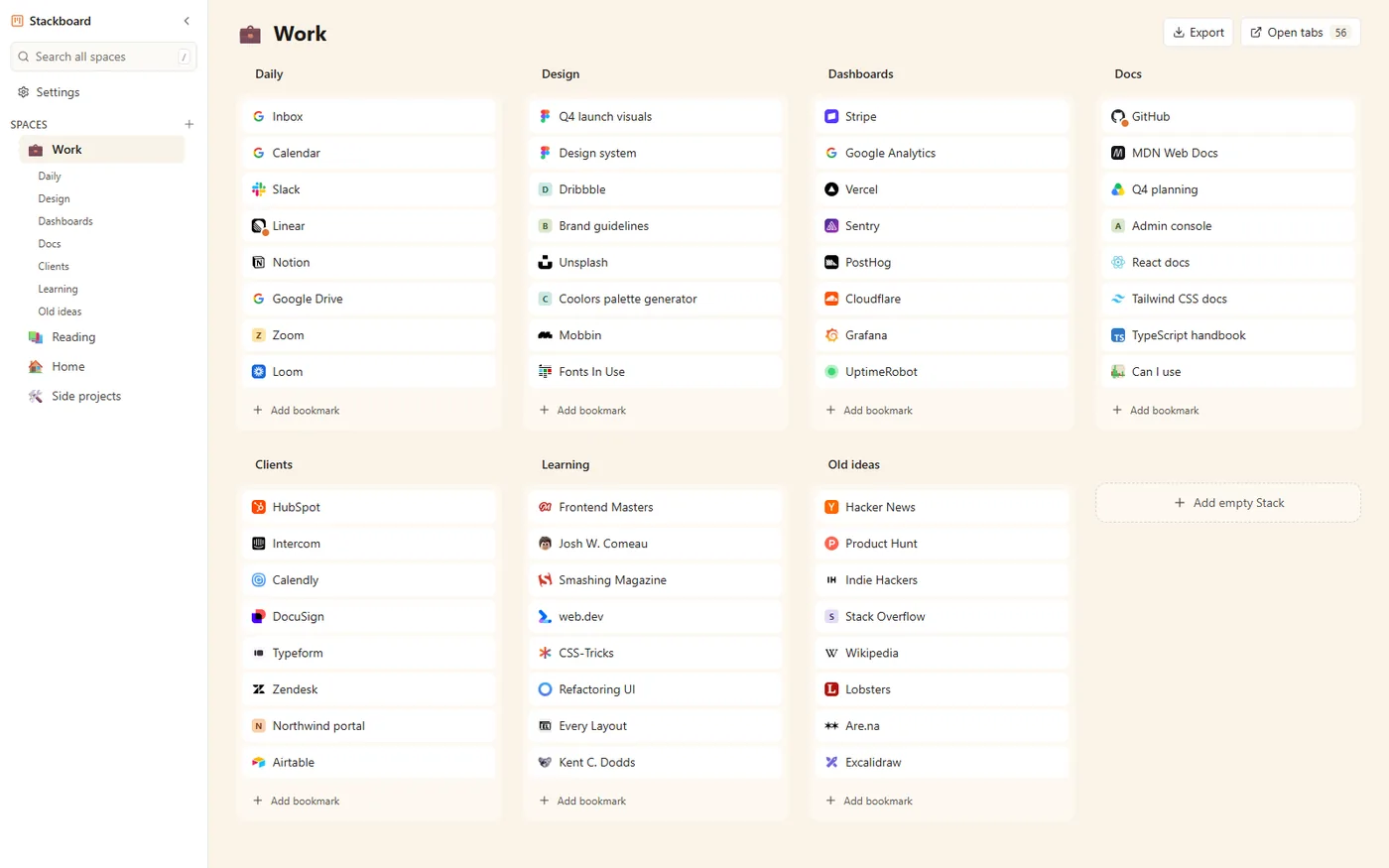
A new tab page made of bookmarks. Stackboard replaces the new tab with a board of your bookmarks: spaces down the side, stacks of links in each, and no cap on how many. One click copies your bookmarks bar in, and everything stays an ordinary Chrome bookmark.
Questions
What is the maximum number of shortcuts on the Chrome new tab page?
10 when you use My shortcuts and 8 with Most visited sites, on a computer. A work or school browser can add up to 10 shortcuts from your organization on top of those.
Is there a flag for more than 10 shortcuts?
Chromium’s development code has an experiment, listed in chrome://flags as NTP Shortcuts Redesign, that raises the cap to 20 in its default setup (October 2026). It’s off by default, may not exist in your version, and experiments can change or disappear without notice.
Can I change a shortcut’s icon?
There’s no option for it. The edit box only has a name and a URL, and Chrome shows the site’s own icon.
Are new tab shortcuts the same as bookmarks?
They’re a separate list that lives on the new tab page, so they don’t appear in the Bookmark Manager. For folders of links, use the bookmarks bar or a new tab extension that shows your bookmarks, such as Stackboard.
Try Stackboard
A free Chrome extension that turns your new tab into a board of your own bookmarks. No account, nothing leaves your browser.
Add to Chrome, it’s freeSources
- Chromium source: ntp_tiles constants (10 custom shortcuts, 8 most visited)
- Chromium source: ntp_features.cc (shortcut limits and the redesign experiment)
- Chromium source: most_visited.ts (Add shortcut tile, Show more, reordering)
- Chromium source: flag_descriptions.h (NTP Shortcuts Redesign)
- Google Chrome Help: Customize your New Tab page in Chrome
- Chrome Enterprise policy list: NTPShortcuts
- Google Chrome Help: Chrome keyboard shortcuts